line 6 · floor modeler

Helix Stadium
Floor

Line 6 Helix Stadium Floor
start learningthe Helix Stadium Floor
lessons
10
reference pages
16
firmware
helix stadium 1.3.2
reviewed
aug 13, 2026

setup, reference and fixes for your Helix Stadium Floor. gridleak presets don't install on it yet.

If your modeler has a joystick and a monochrome screen, you have an original Helix. Read the Helix Floor guide instead. The Stadium XL is the same brain with more footswitches and a second expression pedal.

the guide

7 chapters

common Helix Stadium Floor problems

01
  • the volume knob doesn't change what I'm hearingthe fix
  • my stereo effects collapsed to monothe fix
  • I can't find the cloning featurethe fix
  • song View is empty, or tracks won't playthe fix
  • my footswitches are doing the wrong thingthe fix
  • the screen keeps changing to a block I didn't selectthe fix

6 of 15Helix Stadium Floor fixes

read this first

02

five things that explain almost every problem.

  1. 01

    the volume knob drives one output at a time.

    Press the button above the knob for the output you are listening to, then turn it.

  2. 02

    save, or you lose it.

    Nothing is saved until you press Save twice. Until then, an “E” beside the preset name marks it as edited. Change preset while the E shows and the edit is lost, with no warning and no undo.

  3. 03

    footswitches that seem dead are in the wrong mode.

    The footswitches do not have fixed jobs. What they do depends on the mode. To change mode, press MODE (hold it to see every mode, not just two).

  4. 04

    the cab block goes off when you feed a real amp.

    Cab block ON into anything full-range: headphones, an FRFR speaker, the desk, your computer. Cab block OFF into anything that ends in a real guitar speaker. A cab block is a speaker simulation. Into a real cab it stacks two speakers. Left off into a full-range system, you hear a raw amp with no speaker at all.

  5. 05

    three outputs, three independent mixes.

    The Stadium has three outputs with independent mixes. Check which output you are setting before you change a level.

learn · 10 lessons · 62 min

03
  1. 01what you actually bought4
  2. 02making a sound, correctly6
  3. 03the controls you will use7
  4. 04plugging it into things7
  5. 05how presets are built, and what runs out8
  6. 06snapshots, and why your sound cuts out6
  7. 07what the models are5
  8. 08cloning your own amps6
  9. 09backing tracks and automation7
  10. 10playing live6

reference · 16 pages

04
  • controls and footswitchesinteractive
  • inputs and outputsinteractive
  • specifications
  • levels
  • cabs and IRs
  • rig setupinteractive

open the reference

which one to buy

05

which Helix should you buy?

five full-size Line 6 modelers that share a sound engine and differ in chassis, connections and generation. These are the lines where they differ.

Helix Stadium XL Floor · Helix Stadium Floor · Helix Floor · Helix Rack · Helix LT

compare them

Line 6 · Helix Stadium 1.3.2

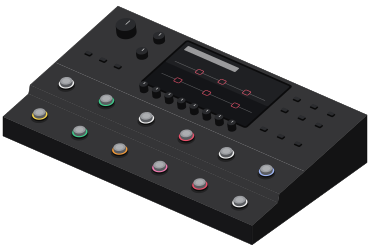
Line 6's flagship floor modeler and the first of a new generation: a touchscreen, eight parameter knobs, 12 footswitches, and a built-in playback and automation engine called Showcase. It runs the whole HX model library plus a new set of Agoura amp models, and since firmware 1.3 it can clone your own amps.